T-Claw Navigate360 – Your Path to College & Graduation Success
T-CLAW Student Success
Your connection to guidance, resources and support at Texas Southern University.
T-CLAW, powered by Navigate360, is Texas Southern University’s student success platform. From enrollment through graduation, T-CLAW connects you with the people, tools, and resources that support your academic journey.
Student Access Faculty & Staff Login
Log in with your TSU NetID and password
For Students: Stay Connected. Take Your Next Step.
With T-CLAW, you can:
- Schedule appointments with your academic advisor and participating campus support services.
- Find support through tutoring, academic resources and student services.
- Receive timely reminders about registration, financial aid and other important deadlines.
- Stay informed through personalized messages and action items.
- Ask for help when you have questions or need guidance on your next step.
Meet T.I.G., Your AI Assistant for Students
Have a question or need help finding the right resource? T.I.G. (Tiger Intelligence
Guide) offers AI assistance 24/7 to help you find information and connect with campus
support.
Responses from campus offices are provided during their operating hours.
Get Started with T-CLAW
Access T-CLAW through the Navigate360 mobile app and select Texas Southern University.
Log in with your TSU NetID and password.
For Faculty and Staff: Connect Students with Support
T-CLAW helps faculty, advisors and student support teams coordinate outreach, document
interactions and connect students with appropriate resources.
Based on your assigned role and permissions, you can:
- Communicate with students through targeted messages and outreach.
- Manage appointments through scheduling, appointment campaigns, reminders and calendar integration.
- Document student interactions using appointment summaries and notes, as appropriate.
- Identify support needs through progress reports, alerts and referrals.
- Coordinate follow-up through case management.
- Review student information and reports to guide outreach and support.
Access the Navigate360 desktop platform using your TSU NetID and password.
Working Together for Student Success
By connecting students, faculty, advisors and campus services, T-CLAW supports a coordinated
student experience focused on persistence, timely support and progress toward graduation.
T-CLAW APP FOR STUDENTS
Schedule appointments, explore majors, find resources, seek assistance and more with the T-CLAW App powered by Navigate360 Student.

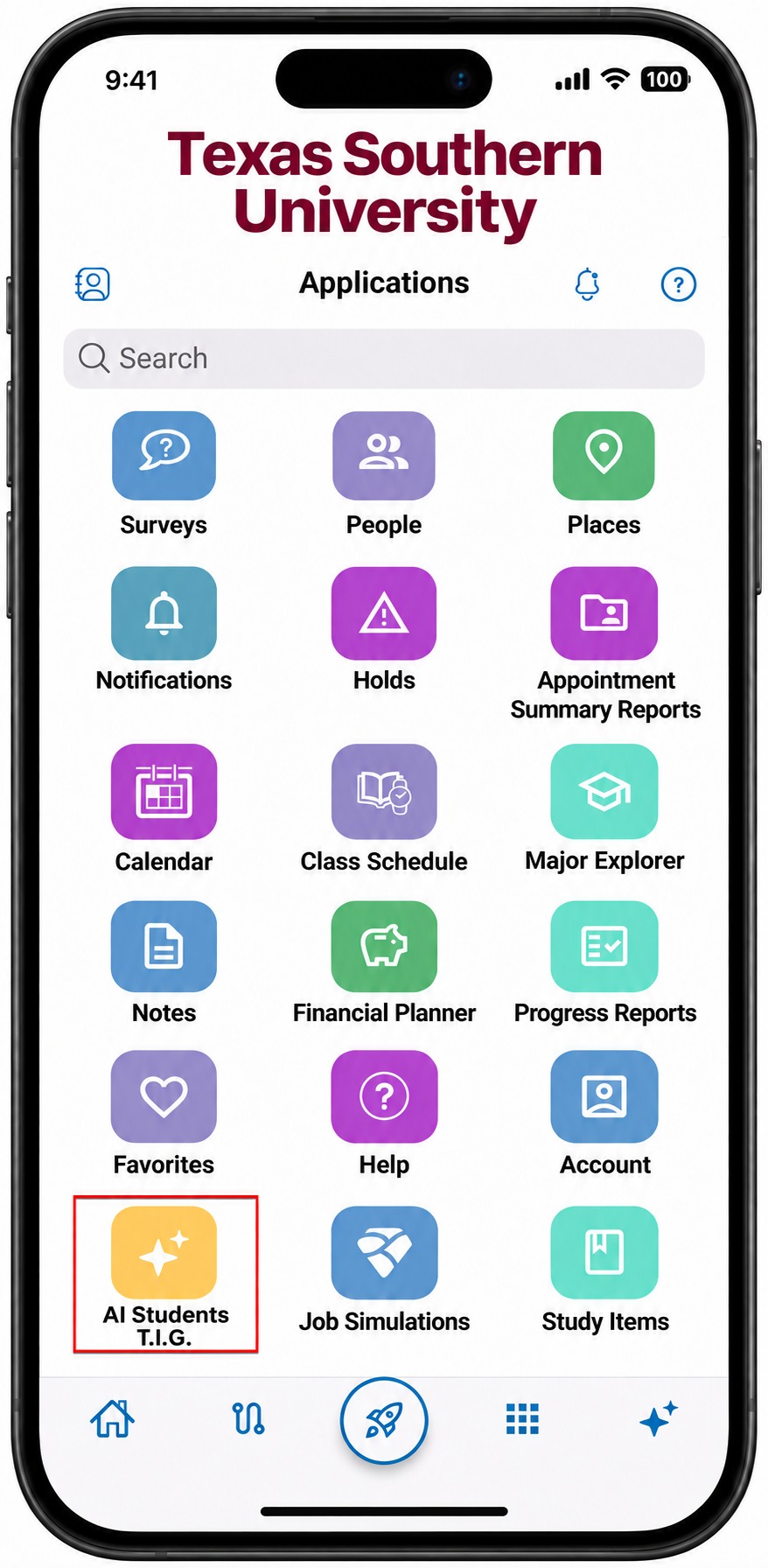
Download the Mobile App
From your mobile device, open your app store and search for “Navigate Student” or if you're already on your mobile device, select a shortcut below. Once installed, open the app, search for “Texas Southern University" and select. Sign in using your university username and password. You can access directly from your desktop browser by clickinghere.


T-CLAW is only avaiable to actively enrolled students.
Information for Students
T-Claw Student App help ease students’ transition to college and keep them on track with tools like a customized timeline of key deadlines, self-service features like Hand Raise and appointment scheduling, visibility into their class schedule and assigned staff, and feedback mechanisms where students can respond to surveys and share how they are adjusting to college.
AI Student Assistant -Tiger Intelligence Guide (T.I.G.)
Need support? Get help anytime 24/7 with T.I.G.
Student Quick Start Guide
Learn how to access T-Claw and connect with campus support.
Schedule Appointment
Connect with an advisor or another available support office.
EXPLORE FEATURES
Ask Student AI T.I.G.
AI Assistant for Students called T.I.G. Your Tiger Intelligence Guide for quick guidance on campus questions, anytime. Ask questions about registration, deadlines, campus resources and more all in one place.
Appointments
Schedule appointments for academic success coaching and other campus services
Hand Raise
Use Hand Raise to request academic information or assistance
Class Schedule
View your class schedule in a list or weekly calendar view
Study Buddies
Form study groups with classmates from your class section(s)
Tiger Walk Student Journeys
Navigate essential steps to achieve your academic and career goals
Major Explorer
Complete a short assessment and explore majors and careers
Explore Interships throug Virtual Job Simulations Participate in industry-developed work simulations for free
Explore career interests and practice workplace tasks through Forage job simulations. These self-paced experiences can help you learn about different roles, build skills, and prepare to discuss your experience with employers.
Explore Job Simulations by clicking here.
Information for Faculty and Staff
Explore a collection of guides and workflow solutions designed to support academic advisors, faculty, and professional staff in scaling student interventions, streamlining daily operations, and fostering a truly coordinated approach to student success. This resource hub includes demonstrations of key tools such as the 360-degree student profile, multimodal communication options, alert and referral features, in-platform appointment scheduling, and more. These solutions are tailored to help deliver timely, effective, and comprehensive support to students.
Faculty and Staff Guide
Utilize the Student Success Platform to Enhance Student Engagement, Streamline Academic Processes and Support Student Success
View the GuideFaculty Training Module
This document introduces faculty to T-Claw Navigate and provides training modules on accessing the platform, setting availability, reviewing student information, scheduling appointments, issuing alerts, and submitting progress reports
View Faculty Training ModuleDocument an Appointment
Guide is to Help You Efficienlty Document Meeting with Students
View the Document GuideSet Office Hours
This Tool will Help You Efficienlty Establish and Manage In-Person and Virtual Office Hour
View Office Hours GuideAI Staff Assistant
Guide to Help you EffectivelyTrack and Engage with Students
View AI Staff AssistantSubmit Progress Reports
Easy Steps on How to Provide Feedback on Students Performance in a Course
View Progress Report 3 Easy Step GuideAI Agent Campaigns
Create Agentic AI Agent Message, Appointment and Event Campaigns
AI Agent Campaign GuideSpring 2027 Semester Progress Reporting
Led by the Office of the Provost, Texas Southern University’s T-CLAW Navigate360 Academic Progress Reports support the university’s strategic priorities to strengthen student retention and academic success. Progress Reports provide a coordinated way for faculty to share feedback on students’ course performance, identify academic concerns early and connect students with timely support.
Week 3 of Semester
Jan 22 (8am) –Jan 30 (11:59pm) Academic Calendar: Census I Jan 27
Week 6 of Semester
Feb 12 (8am) – Feb 20 (11:59pm) Academic Calendar: Midterm Exam Begins Feb 27
Week 9 of Semester
Mar 5 (8am) – Mar 13 (11:59pm) Last day to drop classes with “W” is April 2
Request Faculty or Staff Access
Get started with T-Claw Navigate360 through required training and opportunities for additional support.
- Submit the T-Claw Navigate User Access Request Form.
- Complete Basic Training; Register for and complete the required on demand virtual Basic Training session. This training is required before new users receive limited platform access. Watch Basic Training
- Register for Department Open Lab for additional guidance on using T-Claw Navigate360.
Register for Department Open Lab
Public Safety Officers
Public Safety Officers should complete the designated on demand training linked below.
Register for Public Safety Training
After completing the training, you will receive an email within 48 hours with information about accessing T-Claw Navigate360.
Need Assistance?
Contact the T-Claw support team with questions about training or platform access.
Email responses are provided within 24 to 48 hours.
Resource Library for T-Claw Navigate
Support for Faculty and Staff
| Name | Office | Phone | |
| Dr. Naomi Lawrence-Lee | University Planning & Analytics | 713.313.6748 | tclaw@tsu.edu |